Typography Layout
The Layout lets you enter characters usually unavailable on a keyboard with ease, and this is how it looks:
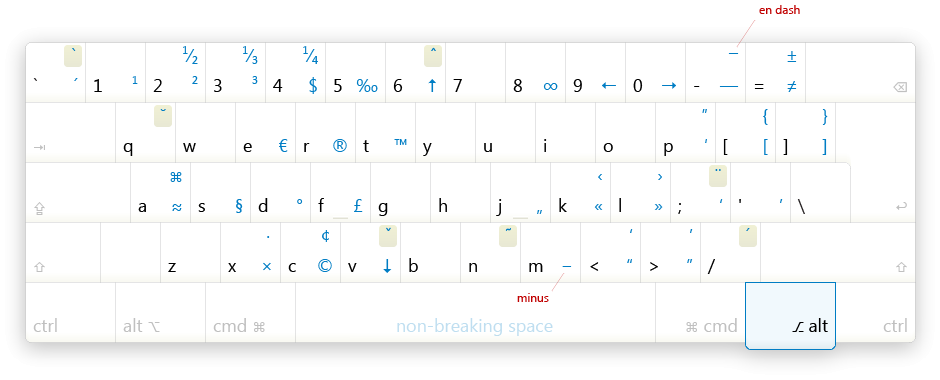
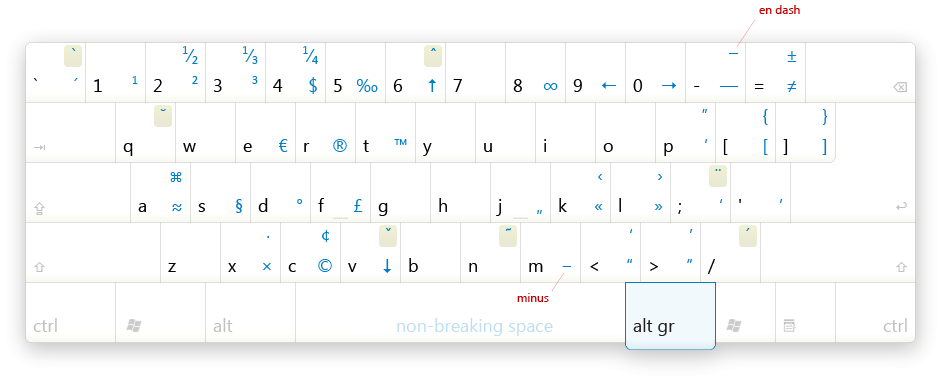
 or
or

 or
or

Use the right Alt key to enter the characters, e. g. Alt + < and Alt + > will output the “quotation marks.” The characters on top are entered by also pressing Shift, e. g. Alt + Shift + C will output ¢.
Please see this Smashing Magazine article for more details on using the layout, some free resources, and a discussion.
Setup
- Run setup.exe.
- Go to Control Panel, Regional and language options (or International).
- In the layout list, replace the layout for the English language with the new one.
Something went wrong or doesn’t work? Vista? Reboot is likely to help.
Removing
Use “Setup or remove software” dialog from Control Panel after you’ve changed the layout back to the default one in International.
 English — Ilya Birman Typography.

I have created the Russian Typography Layout in 2006, and it quickly got wide acceptance among designers and writers. Today it is used in major Russian design bureaux and studios.
The English version is sponsored  Smashing Magazine.